MySQL is one of the most popular systems for storing and managing data. It organizes information in a structured way, allowing websites and applications to work efficiently.
Most web applications – like WordPress, Joomla, Drupal, or osCommerce – rely on MySQL databases to store content, settings, and user data. If your website or app needs a database (especially PHP-based applications), it will likely require MySQL.
A MySQL database stores data in tables made of columns and rows. When your website needs specific information, it sends a query to the database to retrieve it.
WebHost4Life hosting fully supports MySQL databases, making it simple to create, manage, and use databases for your website or web application. With WebHost4Life, you get reliable database performance and full control via your hosting Control Panel.
To create a MySQL database in your WebHost4Life account:
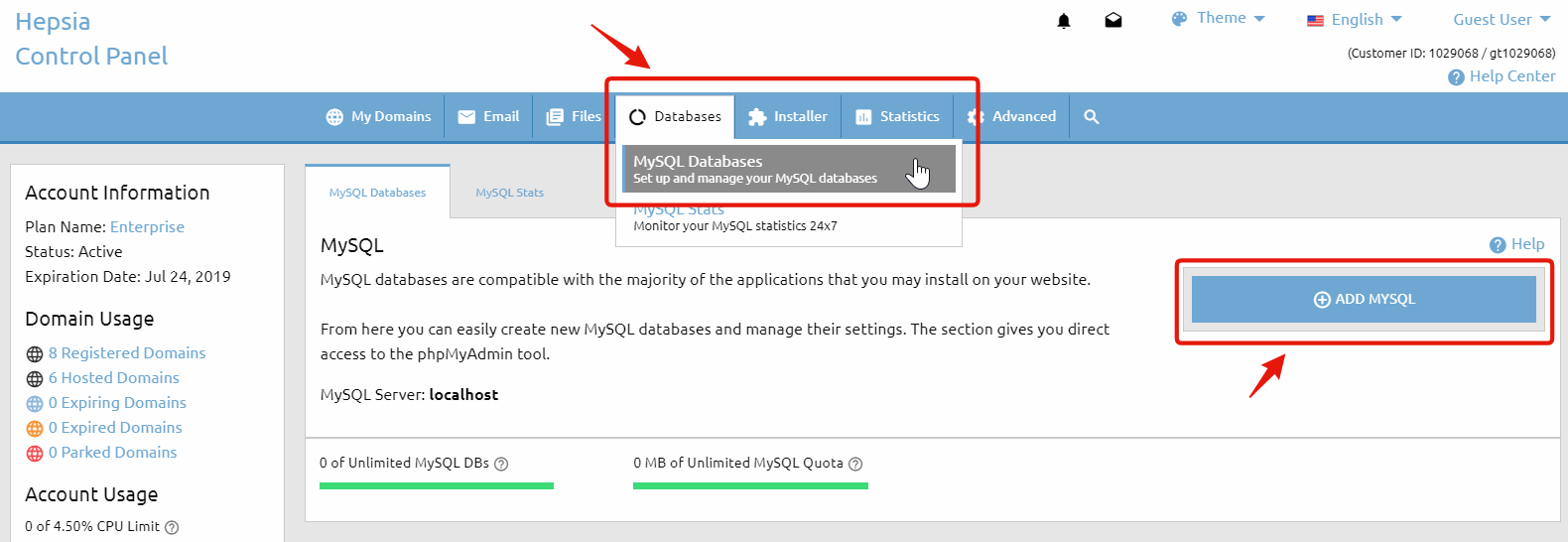
- Go to Databases > MySQL Databases in your Control Panel.
- Click the Add MySQL tab on the right-hand side.
Typically, a separate database is created for each web application you install. This makes it easier to manage your applications individually.
In the MySQL Databases section of your Control Panel, you can view a list of all the MySQL databases you have.
On our servers, the database name and username are the same. For example, if your database is named account_database, the username will also be account_database.
Each database can only have one user, which is created by default. New users cannot be added. The default user has full privileges for that database.
When configuring a script or application to use one of your databases, you will need the following:
- Database name
- Database username (same as database name)
- Password
- MySQL host/server
You can find the MySQL host listed in the table of your existing databases—it is usually localhost.
With your database ready, your website or application can start storing and retrieving data quickly and securely. Get started today with WebHost4Life hosting and enjoy full MySQL database support for your website!